Headings are an important elements of your content that play a key role in both SEO and the user experience. Properly structured heading tags help search engines to understand the content of your page while making it easier for your audience to navigate.
What Are Headings?
Headings are HTML tags that help organize your content into sections. They range from H1 to H6, each representing a different level of importance in the content. H1 is the main title of the page, while H2 breaks down the content into major sections. H3-H6 are used for further subdivisions, helping to organize your content into clear, readable sections.
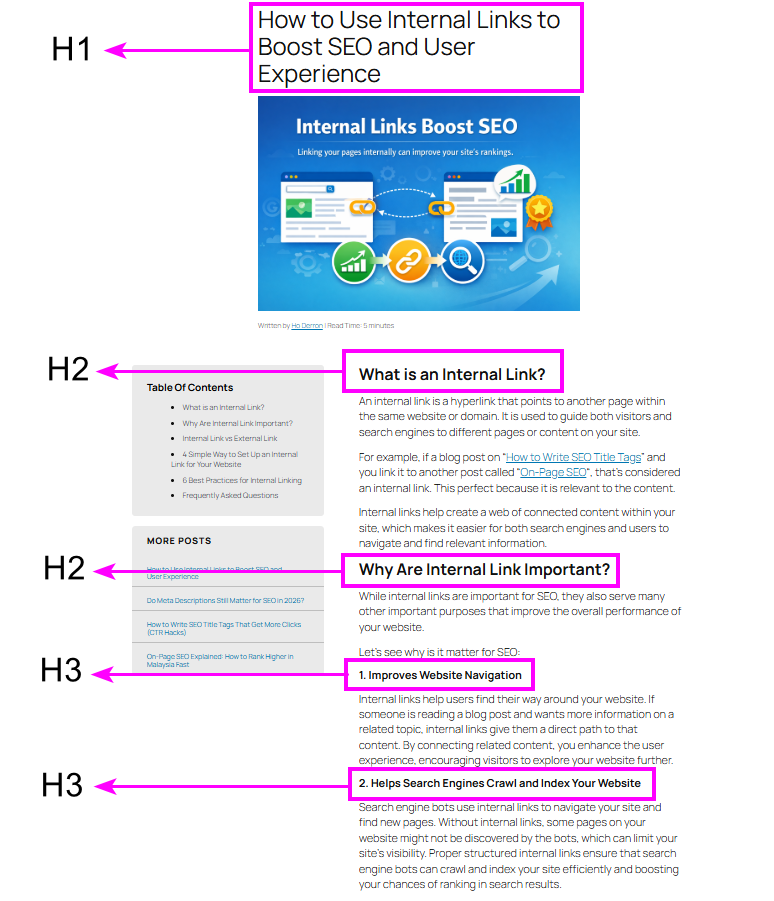
Headings are used not only for organizing content but also to help search engines understand the hierarchy and relevance of information on the page. When used properly, headings make it easier for both search engines and users to find the most important sections of your page.
Is There a Difference Between Header Tags and Heading Tags?
The terms “header tags” and “heading tags” are often used interchangeably, but they actually refer to different things in web development and SEO.
Header Tags
Header tags refer to a specific part of the HTML code that defines the head section of a web page.

Heading Tags
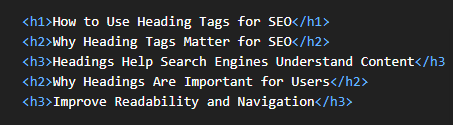
Heading tags refer to the HTML tags (<h1>, <h2>, <h3>,..) used to organize content into sections and subsections.
Why Do People Get Confused?
The confusion arises because the terms are used in a similar context but refer to different elements:
- Header tags: are associated with the header section of an HTML document
- Heading tags: are used in the content section of a web page and help structure the visible content.
Why Are Heading Tags Important for SEO?
Headings are a vital part of on-page SEO. They help search engines crawl and index your content more effectively, which can directly influence your search rankings. Let’s see why headings matter for your webpage:
- Improved Crawlability – Search engines like Google use headings to crawl and index the content efficiently. The more organized your content is, the easier it is for Google to understand the relevance of each section.
- Keyword Optimization – Including target keywords in your headings helps search engines understand what the page is about. This can boost your rankings for those terms without overstuffing keywords.
- Enhanced Search Visibility – Proper use of headings can also help your page appear in rich results and featured snippets, which are directly influenced by how well your content is structured.
Why Are Headings Important for Readers?
Headings are just as important for your readers as they are for SEO. When users visit your page, they expect to quickly scan the content to find the information they’re looking for, which helps meet their search intent.
- Improved Readability – Headings break up the content into smaller, more digestible sections, which makes it easier for readers to skim through and find the information they need.
- Better Navigation – Headings serve as a guide, allowing readers to jump directly to the sections that interest them. This improves engagement by giving them control over how they consume your content.
- Clear Structure – By organizing content with headings, readers get a sense of the overall structure of the page. This makes your content easier to follow and helps users engage with the material more effectively.
How to Use Heading Tags Effectively
To make the most out of heading tags, here are some best practices to follow:
- Use One H1 Tag – Your H1 tag should be reserved for the main title of your page. This tag should be used only once per page and should describe the primary topic of the content. Make sure the H1 includes your main keyword for relevance.
- Organize Content with H2 – Use H2 tags for major sections of your content. Each H2 should introduce a new topic or aspect of your page’s overall subject.
- Use H3 and H4 for Subsections – Use H3 and H4 tags to break down your H2 sections into smaller subtopics. This helps create a clear structure that’s easy to follow for both users and search engines.
Where Should You Place Your H1, H2, H3?
The placement of headings is crucial for maintaining a clear structure:
- H1 – This should be the main title of your page, and it should be placed at the top of your content. H1 tag should clearly describe the overall subject of your page.
- H2 – These headings should be placed after the H1 and break down your content into major sections. Use H2 for each key point or topic in your content.
- H3 and H4 – These should come under H2 sections and further break down the content. For example, under the H2 “Why SEO is Important,” you could have H3 tags like “Keyword Research” and “On-Page SEO.”
By following this structure, your content will be organized, making it easier for both search engines and readers to navigate.
How Many H1 Headings Should You Use?
You should only use one H1 tag per page. The H1 tag is meant to represent the main title of your page. Therefore, using more than one H1 tag can confuse search engines about the main focus of your content. So, best is to stick with one H1 and then use H2 and H3 tags for further organization.
Using a single H1 tag ensures that your page has a clear, consistent hierarchy, which is important for both SEO and user experience.
How to Use H2 and H3 Headings
- H2 – Use H2 for the main sections of your page. Each H2 should represent a key topic or idea. For example, a section on “SEO Best Practices” could use an H2 for each subtopic like “Keyword Research” and “Content Optimization.”
- H3 – Use H3 to break down the content further under each H2. For example, under a section about “Keyword Research,” H3s might cover “Finding the Right Keywords” and “Using Keywords in Content.”
Common Mistakes When Using Headings
Even experienced content creators can make mistakes when using heading tags. Some of the most common mistakes include:
- Using Multiple H1 Tags – Stick to one H1 tag per page. Multiple H1 tags confuse search engines and users, making it harder for both to understand the main topic of your content.
- Overstuffing Keywords – Avoid inserting too many keywords into your headings. Make sure your headings are natural and focused on the content, not just keyword targeting.
- Irrelevant Headings – Ensure that your headings are relevant to the sections they precede. Misleading headings can frustrate readers and lead to higher bounce rates.
- Skipping Heading Levels – Don’t jump from H1 to H3 without using H2. Use a logical structure for headings to maintain clarity.
Frequently Asked Questions
How many headings should I use on a page?
Use one H1 for the main title, several H2s for major sections, and H3-H6 for sub-sections to create a logical and clear structure.
Can I use multiple H1 tags on one page?
It’s best practice to use only one H1 per page to maintain a clear content hierarchy. Multiple H1 tags can confuse both users and search engines.
Should I include keywords in my headings?
Yes, include relevant keywords in your headings, but avoid overstuffing. Keep the headings natural and helpful for readers.